What Do the Eyes Mean on a Snapchat Story? (2026 Guide)
If you opened Snapchat and saw a little eye icon next to your story, you probably stopped and thought, “Wait, what does that mean?” You are not alone. Many people see this small symbol and feel a bit confused, especially if they are new to Snapchat or just do not use it every day. The good news is that this is actually one of the easiest things to understand once someone explains it in simple words. In short, the eye icon on Snapchat just shows you how many people have viewed your story. That’s it. No secret meaning, no hidden trick. Once you know that, everything else about Snapchat views becomes a lot easier to understand.
In this article, we are going to walk through everything about the eyes symbol on Snapchat stories. We will explain what it looks like, why Snapchat uses an eye for this, how you can check who viewed your story, and a few small tips that can help you understand your Snapchat activity better. Think of this as a friendly walk-through, the kind a patient friend would give you while sitting next to you with your phone.
Snapchat Eye Icon Meaning Explained Simply
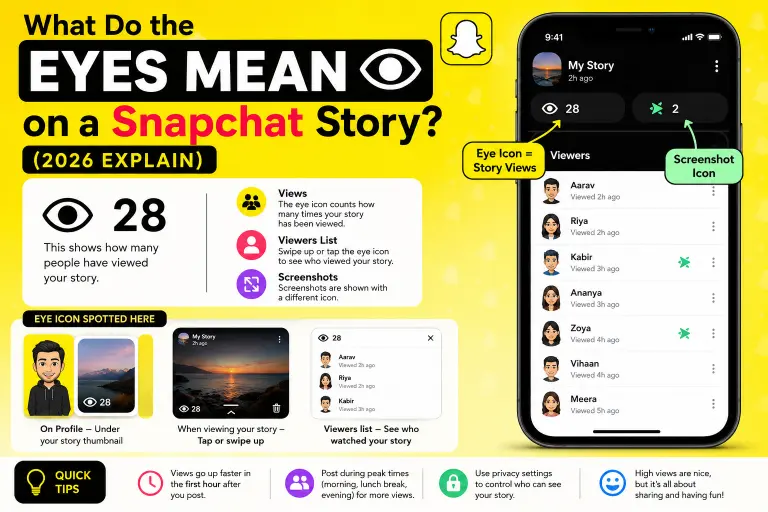
SWhen you post a story on Snapchat, your friends can watch it for 24 hours. Every time someone opens your story and watches it, Snapchat counts that view. The eye icon is simply Snapchat’s way of showing you that count in a quick and visual way.
So when you see an eye shape next to a number, that number tells you how many people have watched your story so far. It is a bit like a small window into how many eyes have actually looked at what you shared. That is probably why Snapchat chose an eye picture in the first place. It makes sense visually, and it is easy to remember.
This little icon removes the need for long text like “12 people viewed your story.” Instead, Snapchat keeps things clean and simple with just a picture and a number.
Where to Find the Eye Symbol on Snapchat
You will usually see this icon in a few different places inside the app. The most common spot is right under your story thumbnail on your profile page. If you tap on your own story, you might also see a small eye symbol along with the number of views, sometimes next to a list of names.
Snapchat likes to keep its design simple, so this icon shows up quietly without being loud or distracting. It blends into the interface, but once you know what to look for, you will start noticing it every time.
Why Snapchat Displays Story View Counts
You might wonder why Snapchat even bothers to show this information. The reason is pretty human, honestly. People like to know if others are paying attention to what they share. It gives a small sense of connection. When you post a funny video or a nice photo, seeing that people actually watched it can feel encouraging.
At the same time, Snapchat wants to keep things private and simple, unlike some other apps that show public likes or comments. Instead of open reactions, Snapchat quietly tells you the view count through this eye icon, and you can dig deeper if you want to know exactly who watched.
How to Check Who Viewed Your Snapchat Story
Knowing the number of views is nice, but many people also want to know exactly who watched their story. Thankfully, Snapchat makes this simple too.
To check this, open your story, then swipe up or tap on the eye icon or the small text below your story. This should open a list showing the names of everyone who has viewed it. If you have a lot of viewers, you might also see the total number of screenshots taken, which is shown with a slightly different symbol.
This feature is helpful if you want to know if a specific friend saw your story, or if you are just curious about who is active and watching your content regularly.
Snapchat Views vs Screenshots: What’s the Difference
It is worth mentioning that Snapchat separates views from screenshots. The eye icon represents views only, meaning someone opened and watched your story. If someone takes a screenshot of your story, Snapchat usually shows a different icon, often shaped like an arrow or a small screenshot symbol, right next to that person’s name in your viewer list.
This distinction matters because views and screenshots tell you two different things. Views tell you how many people simply watched, while screenshots tell you if someone wanted to save or keep a copy of what you shared.
Does the Eye Icon Show Live Viewing Activity?
This is a common question, and the answer is no. The eye icon does not mean someone is actively watching your story at this exact moment. It simply counts how many times your story has been opened and viewed since you posted it. So if you see the number go up, it just means someone recently watched it, not that they are watching live.
Helpful Tips Based on Real Snapchat Experience
After using Snapchat for a while, you start noticing small patterns. For example, view counts usually go up quickly right after you post something, especially in the first hour, because that is when most of your friends are checking the app. If your views feel low after that first hour, it does not mean your story was bad. Sometimes friends are simply busy, asleep, or not using their phones.
Another helpful tip is that if you want more people to see your story, posting during times when people usually check their phones, like early morning, lunch break, or evening, can help increase your views naturally. You can read more guides on this topic later if you want to explore Snapchat features like Snap Score, Snap Streaks, or private story settings, since they all connect nicely with understanding your story views.
Why the Story View Feature Is Actually Useful
Some people think tracking views feels unnecessary, but it actually helps in small, everyday ways. It helps you know if your friends are seeing your updates. It helps you notice who is consistently checking in on you. It also helps you understand your own social circle better over time.
Final Thoughts
The eye icon on a Snapchat story is honestly one of the simplest features in the entire app once it’s explained clearly. It just shows how many people have watched your story, nothing more and nothing less. Once you understand this small detail, using Snapchat becomes a lot smoother and less confusing. Snapchat keeps changing small design details every year, but the core idea behind the eye icon has stayed the same for a long time, which shows how useful and simple this feature really is.