How to Half Swipe on Snapchat in 2026: Step-by-Step Guide
Have you ever gotten a Snapchat message and felt a little nervous to open it? Maybe you were not ready to reply yet. Maybe you just wanted to peek at what your friend said without them knowing you saw it. This is a very common feeling, and a lot of Snapchat users deal with it every single day.
The good news is there is a simple trick for this. It is called the half swipe. It lets you look at a message without fully opening it. Your friend will not get the “Opened” notification right away. In this guide, we will walk through exactly how to do it in 2026, step by step, in a way that is easy for anyone to follow.
What Does Half Swiping Mean on Snapchat
Half swiping is when you slide a chat over just a little bit, instead of tapping it all the way open. Think of it like opening a door just a crack to peek inside a room, instead of walking all the way in. You get to see what is happening, but nobody inside the room knows you looked.
On Snapchat, when you fully open a chat, the app sends a signal to the other person. It tells them you read the message; this is called a read receipt. But when you half-swipe, you stop before that signal gets sent. The message stays looking “unread” or “delivered” on their end, even though you already saw it.
This trick has been around for years, and people still search for it because it gives a small sense of privacy. It helps you read something without feeling rushed to answer right away.
Why People Still Use the Half Swipe Trick
There are many small reasons why someone might want to half swipe a message. Maybe you are in a meeting and cannot reply yet. Maybe you got a message late at night, and you are too tired to write back. Maybe you just want a moment to think about what to say before you commit to opening the chat.
Some people also use it just out of curiosity. They want to know what a message says before deciding if it is worth a full reply. This is a very human thing to do, and it is not really about being sneaky. It is more about having a little bit of control over your own time and attention.
How to Half Swipe on iPhone
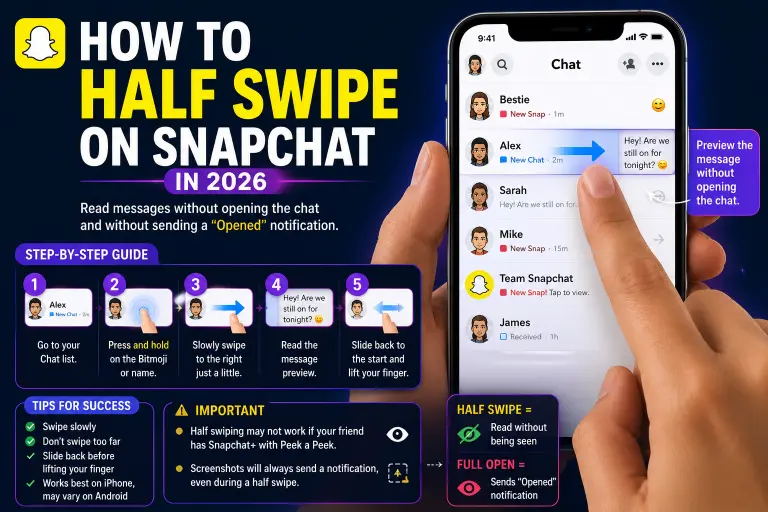
Half swiping works a bit differently depending on your phone, so let us start with iPhone users since the gesture tends to feel smoother on iOS devices. First, open the Snapchat app and go to your Chat screen. This is the tab where you see the list of all your friends and their messages. Find the chat you want to peek at, but do not tap it.
Instead, gently press down on your friend’s Bitmoji or their name, right on the left side of the screen. Keep your finger pressed down, and slowly drag it toward the right. Move it just a little bit, not all the way across the screen. As you drag, you should start to see a little bit of the message text appear. This is the moment you want to stay in. Do not let go of the screen yet. Read as much as you can while your finger is still touching the screen.
Once you are done reading, slowly slide your finger back to the left, all the way to where you started. Only after the chat looks closed again should you lift your finger off the screen. If you did this slowly and carefully, the message should still show as unread on your friend’s side.
How to Half Swipe on Android
Android phones can behave a little differently because there are so many different brands and models. Some Android phones are more sensitive to touch than others, so this trick might take a bit more practice. Start the same way: open Snapchat and go to the Chat tab. Find the message you want to check. Press down gently on the Bitmoji icon next to the chat, not directly on the text.
Slowly move your finger to the right. Go slow, because Android screens can sometimes register a fast swipe as a full open. You should see the message preview begin to show under the name. Keep your finger steady and read the message. When you are finished, slide your finger back to the starting point before lifting it away. If your phone is a newer model with a very sensitive screen, you may need to try this a few times before it feels natural.
Common Mistakes That Break the Half Swipe
Almost everyone struggles with this trick at first, so do not worry if it does not work perfectly on your first try. Here are the most common reasons it fails.
Swiping too fast is the biggest problem. When your finger moves quickly, Snapchat often reads this as a full open, and the read receipt gets sent right away. Slow and steady movements work much better than quick ones.
Swiping too far is another common mistake. If you drag your finger more than halfway across the screen, the chat will usually open completely. Try to stop your swipe somewhere around the middle of the screen, or even a little less.
Letting go too early is also a problem. Many people read the message and then lift their finger straight up out of excitement or habit. This can trigger the “Opened” status. Always remember to slide back to the start before lifting your finger.
A dirty or wet screen can also cause accidental swipes, so it helps to wipe your screen clean before trying this trick.
Does Half Swiping Still Work in 2026
This is the question everyone wants answered, and the truth is that it depends. Snapchat has changed its app many times over the years, and each update can affect how well the half swipe trick works.
Many users report that it still works in 2026, especially on iPhones, because iOS tends to handle touch gestures a little more smoothly than some Android devices. However, it is no longer as reliable as it once was. Some updates have made the app more sensitive, so even a small swipe can accidentally count as opening the message.
Because of this, it is a good idea to think of half swiping as a trick that sometimes works, rather than something you can count on every single time. If it fails and the message opens fully, that is okay. It is not a huge deal, and most people will not even notice or care.
A Simple Tip From Experience
One thing that really helps is practicing on chats that do not matter much, like messages from official Snapchat accounts or old group chats. This way, if you accidentally open the message, there is no pressure or awkwardness. Once you get a feel for how much pressure and speed your screen needs, doing it on real conversations becomes much easier.
Another helpful tip is to use two hands when trying this for the first few times. Hold your phone steady with one hand and use the other hand’s finger to do the swipe. This gives you much more control than trying to do everything with one thumb.
What About Snapchat Plus and Peek a Peek
If you or your friend has Snapchat Plus, there is a feature called Peek a Peek that you should know about. This feature can show a small eye icon or a moving Bitmoji when someone is previewing a chat, even if they are only half swiping. This means the half swipe might not stay completely hidden from Snapchat Plus users. Keep this in mind if privacy is your main goal.
Alternatives to Half Swiping
If half-swiping feels too tricky or doesn’t work well on your phone, there are a few other ways to check a message without fully opening it. You can look at the notification banner that pops up on your lock screen. This often shows a short preview of the message without opening the app at all.
Turning on Airplane Mode before opening the app is another method some people use, though it takes a few extra steps and is not always reliable. You can read more guides on this topic later if you want to explore these other privacy tricks in more detail.
Final Thoughts
Half swiping on Snapchat is a small but handy trick that gives you a little more control over your messages. It takes some practice, and it will not always work perfectly, especially as Snapchat continues to update its app. But with a slow, gentle swipe and a bit of patience, most people can still get the hang of it in 2026.